global_mute_for_google_meet
🔇 Global Mute for Google Meet
A lightweight Chrome extension to globally mute or unmute your microphone on Google Meet — even when you’re outside of Chrome.
Built using Manifest V3 with clean code and customizable hotkeys.
🚀 Features
- 🎤 Toggle Mic on Google Meet with
Ctrl + Shift + Z - 🔄 Switch to active Meet tab with
Ctrl + Shift + M - 🏠 Navigate to Meet home (
https://meet.google.com) withCtrl + Shift + G - 🌐 Works globally — even when Chrome is not in focus
- ⚙️ Hotkeys are configurable via
chrome://extensions/shortcuts
💻 How to Use
- Install the extension (download or clone this repo, then load it as unpacked — see below).
- Join or open a Google Meet call.
- Use the configured hotkeys to control the mic or navigate between Meet tabs.
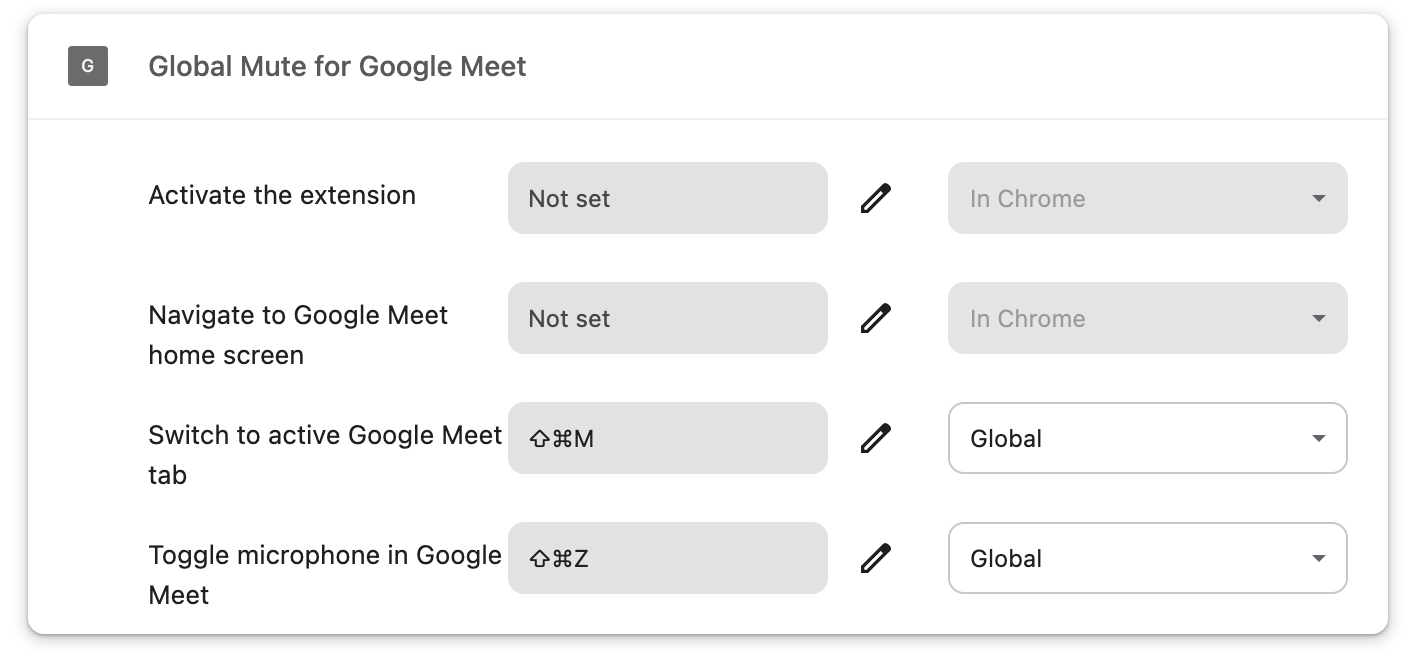
⌨️ Set Global Keyboard Shortcuts
-
Open Chrome and visit:
chrome://extensions/shortcuts -
Find Global Mute for Google Meet
- Set the shortcuts:
- Toggle microphone in Google Meet →
Ctrl + Shift + Z - Switch to active Google Meet tab →
Ctrl + Shift + M - Navigate to Google Meet home screen →
Ctrl + Shift + G
- Toggle microphone in Google Meet →
- Change the dropdown on the right from
In ChrometoGlobal.
✅ Example
🧩 How to Load Unpacked Extension (for development)
- Clone or download this repo.
- Visit:
chrome://extensions/ - Enable Developer mode.
- Click Load unpacked and select the folder containing
manifest.json. - Done!
📁 Folder Structure
MuteForMeetMV3/
├── manifest.json
├── background.js
├── content.js
├── popup.html
├── popup.js
├── icon.png
├── icon48.png
├── icon128.png
└── screenshots/
└──── global-shortcut-setup.png
🛠 Tech Stack
- Manifest V3
- Chrome Extensions API
- JavaScript (no frameworks)
- Service Worker for hotkey handling
- Content scripts for mic control
📦 Publishing Notes
This extension is compatible with the latest Chrome requirements. Once tested, zip the folder contents and upload it to the Chrome Web Store Developer Console.
📄 License
Apache-2.0 license. Free to use and modify.
🙌 Credits
Built by zegulas — feel free to contribute or report issues!